







A lead waits overnight for a response. A discovery call ends without assigned next steps. A renewal approaches while account information sits in several systems. AI sales agents can help address these gaps by gathering context and carrying out permitted actions within defined workflows, extending AI sales automation to tasks that require interpreting information and choosing a next step.
Salesforce Sales Cloud, now Agentforce Sales, illustrates how CRM information, seller assistance, and delegated workflows can work together. This guide explores eight use cases across prospecting, deal progression, and account growth, with examples and success measures to help you decide what to delegate and where sellers should remain involved.
- AI sales agents across the sales cycle: At a glance
- 1. Research and prioritize target accounts
- 2. Qualify and route inbound leads
- 3. Engage prospects and schedule meetings
- 4. Prepare discovery briefs and coordinate follow-up
- 5. Answer product questions and assemble proposal drafts
- 6. Flag deal risks and coordinate next steps
- 7. Prepare sales-to-customer-success handoffs
- 8. Identify renewal and expansion opportunities
- How to prioritize AI sales agent use cases
- What to verify before deploying AI sales automation agents
- Bottom line
AI sales agents across the sales cycle: At a glance
AI sales agents use available information and permitted tools to work toward a defined goal. Depending on its configuration, it may research a prospect, respond to a question, create a task, or propose a record update. Some workflows require approval before an action proceeds.
Use the table to match a sales bottleneck to a potential workflow. The examples below are hypothetical and may combine AI assistance, agent actions, and conventional automation. Availability depends on the product, integrations, licensing, and configuration.
| Use case | Sales stage | Intended outcome |
|---|---|---|
| Research target accounts | Prospecting | Evidence-backed account priorities |
| Qualify inbound leads | Qualification | Complete details and accurate routing |
| Engage prospects | Outreach | Qualified meetings with context |
| Coordinate discovery | Discovery | Prepared sellers and assigned next steps |
| Support buyer evaluation | Evaluation | Supported answers and proposal drafts |
| Coordinate deal actions | Negotiation and closing | Fewer overlooked commitments |
| Prepare customer handoffs | Post-sale transition | Verified delivery context |
| Identify account opportunities | Renewals and expansion | Timely account reviews |
An assistant that drafts a message and AI sales agents that send it carry different authority. Evaluate the workflow’s permitted actions and approval points, including what happens when information is missing or a request falls outside scope.
1. Research and prioritize target accounts
Sales prospecting often starts with scattered information: CRM records, company websites, account notes, and approved third-party data. An agent configured for account research could gather that information, compare accounts against your selection criteria, and prepare recommendations with supporting evidence.
Define what happens after the research. Saving findings to the CRM or queuing accounts for review creates a repeatable workflow. Sellers should also be able to inspect sources and dates — a company’s expansion announcement may justify further investigation, but it does not establish an approved budget.
Salesforce’s prioritized prospect view illustrates how ranked recommendations can include supporting signals.
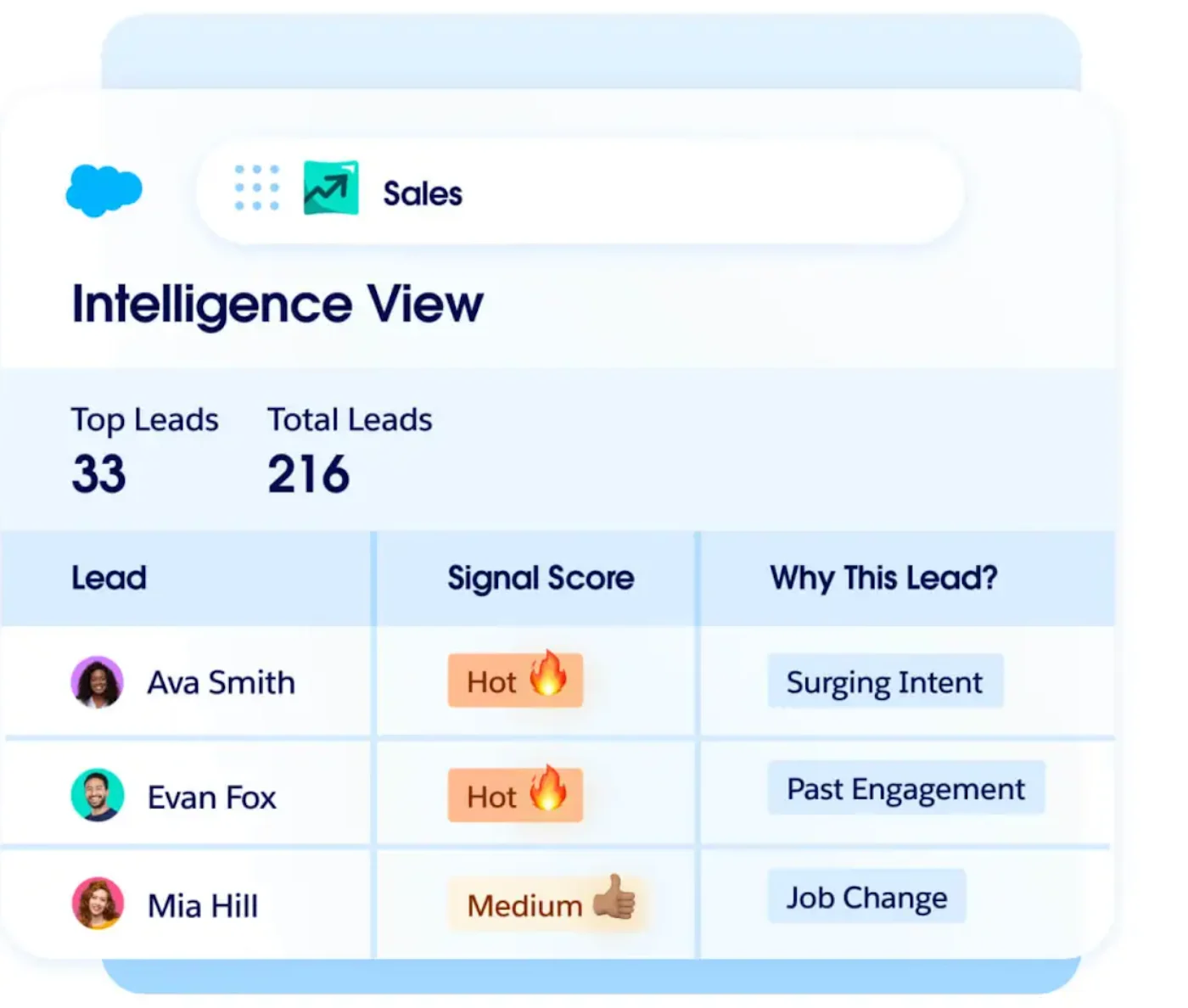
What it needs: Account selection criteria, reliable account identifiers, CRM records, and access to approved research sources.
Example: A software company targets manufacturers opening new locations. The agent reviews an approved account list, identifies relevant announcements, and saves research notes. Accounts without sufficient evidence are flagged for further investigation.
Human handoff: Sellers validate relevance and resolve conflicting information before approving outreach.
Measure success: Compare research time per accepted account and the percentage of recommendations sellers consider worth pursuing.
Also read: Online Lead Generating Tactics That Improve B2B Prospecting
2. Qualify and route inbound leads
Inbound lead qualification is useful when inquiries wait for someone to gather basic information or determine ownership. An agent could ask approved questions, record responses, and route the inquiry according to your qualification and assignment rules.
Specify how it should handle incomplete answers. An unknown budget should not automatically disqualify a prospect; the inquiry may need another question or a seller’s assessment.
Salesforce’s Qualification Agent provides an example of the assessment portion. Its documentation describes lead ratings accompanied by qualification summaries, missing information, and suggested next actions. Routing still needs its own assignment rules and configuration.
-9.png)
What it needs: Qualification questions, assignment rules, contact details, and an owner or queue for exceptions.
Example: A buyer contacts an equipment supplier after hours. The agent collects the equipment category, location, intended use, and requested timeline, then routes the inquiry to the relevant territory rep with a summary.
Human handoff: Escalate unclear requirements, conflicting ownership, and questions outside the agent’s approved information.
Measure success: Track qualification completeness, routing accuracy, and time to a useful response. A fast acknowledgment alone does not show that the inquiry moved forward.
Also read: Best Lead Qualification Software for Sales Teams
3. Engage prospects and schedule meetings
Once a prospect is eligible for contact, an agent may conduct approved outreach, answer routine questions, and help arrange a meeting. This requires access to the communication channel, approved business information, and a supported scheduling process.
Build stop conditions into your sales cadence. An opt-out, booked meeting, or request for a human should change what happens next. Another automated follow-up after the prospect has responded can undermine the conversation.
Salesforce’s meeting-booking example shows an agent offering meeting times by email.
-5.png)
What it needs: Contact eligibility and opt-out records, approved product information, email access, and a supported calendar or booking integration.
Example: A qualified prospect asks whether a product connects with an existing system. The agent provides an approved answer, offers available meeting times, and passes the conversation history to the seller.
Human handoff: Route sensitive sales objections, unusual requirements, and requests for commercial commitments to a rep.
Measure success: Evaluate qualified meetings held, prospect complaints, and handoff completeness. Booking volume alone can conceal poorly matched conversations.
4. Prepare discovery briefs and coordinate follow-up
Discovery call preparation should help sellers enter meetings with context and useful questions. A configured agent could gather previous interactions, stakeholder details, and unresolved issues into a brief, then identify gaps to explore.
After the meeting, it could use approved notes or an authorized transcript to propose follow-up and create permitted tasks. The workflow should distinguish a buyer’s confirmed commitment from a seller’s suggestion. Generating a recap provides assistance; creating and assigning authorized tasks adds execution.
Salesforce’s meeting brief illustrates the preparation portion of this workflow.
-8.png)
What it needs: Account history, meeting details, approved notes or transcripts, and access to CRM tasks and follow-up templates.
Example: Before a managed IT provider’s discovery call, the agent compiles stated requirements and flags an unanswered question about implementation timing. After the call, it drafts a recap and, following seller approval, assigns the agreed technical review to the solutions consultant.
Human handoff: The seller confirms the recap, commitments, task owners, and deadlines before customer-facing follow-up.
Measure success: Track preparation time, corrections to summaries, and the proportion of agreed next steps captured with the correct owner and due date.
5. Answer product questions and assemble proposal drafts
Buyer evaluation creates repeated requests for product details, integration information, and supporting documents. With access to current, approved materials, an agent could retrieve answers and assemble a proposal draft around confirmed requirements.
Keep narrative content separate from commercial facts. Compatibility claims need supporting documentation, while pricing and discounts need authorized records or systems. Permission to draft a proposal does not automatically include permission to offer new terms.
Salesforce’s quote-email example illustrates preparing a commercial follow-up with an attached quote.
-10.png)
What it needs: Current product documentation, confirmed requirements, an approved proposal template, and authorized commercial data.
Example: A buyer requests an integration overview and a proposal for two business units. The agent retrieves approved documentation, populates the proposal template with confirmed scope, and flags a requested service missing from the approved catalog.
Human handoff: Product specialists and commercial owners resolve unsupported claims, security assurances, pricing exceptions, and contract language.
Measure success: Compare response turnaround, factual correction rates, and specialist rework. Faster drafts should also preserve the accuracy of the offer.
6. Flag deal risks and coordinate next steps
Late-stage deals can appear healthy while key actions remain unresolved. An agent could inspect opportunity records and permitted conversation data, identify gaps, and create authorized follow-up tasks.
This supports sales pipeline management when findings point to evidence. A delayed technical review or overdue buyer commitment gives the seller something to address; an unexplained risk label offers less direction.
Salesforce’s Pipeline Management training exercise demonstrates reviewing a suggested next-step update before applying it. That provides a concrete example of keeping sellers involved when AI interprets sales conversations.
-11.png)
What it needs: Opportunity records, agreed stage criteria, activity history, and access to task owners and due dates.
Example: An opportunity is expected to close this month, but the buyer’s security review has no completion date. The agent flags the gap and assigns a follow-up task to the deal owner, who confirms the buyer’s timeline.
Human handoff: Sellers or managers determine whether the evidence justifies a stage change, forecast adjustment, or negotiation action.
Measure success: Track the accuracy of flagged risks and resolution of overdue actions. An email reply alone is insufficient evidence that a deal has advanced.
Also read: 9 Free Follow-Up Email Templates That Inspire Responses
7. Prepare sales-to-customer-success handoffs
After a deal closes, customer success needs to know what was sold, who is involved, and which commitments remain outstanding. An agent could gather the signed scope, approved notes, stakeholder details, and open issues into a handoff record.
The workflow should also identify missing information and assign the next action to an owner. Contractual commitments must remain distinguishable from ideas discussed during the sale.
This Salesforce example shows an AI sales agent software directing a prospect to a human contact for trial setup and guidance. It illustrates an agent-to-seller handoff during evaluation, making it a better fit for the prospect engagement section than the post-sale customer-success handoff.
-10.png)
What it needs: Signed scope, approved commitments, stakeholder records, and access to the onboarding or customer-success system.
Example: A consulting firm closes a project with a target kickoff date. The agent prepares the handoff package but flags that the customer has not named a technical owner. It creates an internal task to resolve that gap before kickoff.
Human handoff: The account owner and delivery team verify scope, dates, and outstanding obligations.
Measure success: Track missing handoff fields, clarification requests, and time to kickoff. Faster transfers should still convey accurate commitments.
Also read: What Is B2B Sales & Marketing Data? How to Align It for Greater Impact
8. Identify renewal and expansion opportunities
Existing-account work can be overlooked when sellers focus on new deals. With access to appropriate information, an agent could identify approaching renewals, compile relevant signals, and prompt an account review. Saving the brief and assigning a review task gives someone responsibility for acting on the finding.
Treat signals as reasons to investigate. Increased usage, a new location, or a leadership change may warrant a conversation, but none establishes purchase intent. Unresolved service issues may make relationship repair more urgent.
Salesforce’s account-plan research view illustrates gathering context for account reviews.
-9.png)
What it needs: Renewal dates, account ownership, contract details, and permitted usage and service information.
Example: A customer’s renewal is approaching while another division is considering a similar purchase. The agent prepares an account brief, highlights unresolved service issues, and assigns a review task to the account manager.
Human handoff: Account managers decide whether to pursue renewal, expansion, or a service-led conversation and approve the commercial approach.
Measure success: Track timely account reviews, relevance of flagged opportunities, and subsequent progression. Revenue outcomes require a longer observation period than task completion.
Also read: RevOps Framework: How to Align Sales, Marketing, and Customer Success
How to prioritize AI sales agent use cases
When comparing AI sales agent use cases, start with a recurring bottleneck, a clear owner, and an outcome you can measure. You should be able to explain what triggers the work, what information it needs, and what counts as completion.
| Your bottleneck | Starting use case | First metric to track |
| Reps repeat account research | Account research | Time per accepted account |
| Inquiries reach the wrong team | Qualification and routing | Routing accuracy |
| Eligible prospects wait for follow-up | Prospect engagement | Qualified meetings held |
| Agreed deal actions go unassigned | Next-step coordination | Correctly assigned actions |
| Customer success repeats discovery | Post-sale handoffs | Clarification requests |
Use the checklist below to define your pilot’s scope, assign ownership, and set success measures before launch. Track the results to decide whether to expand, revise, or stop the workflow.
Account for the full operating effort
Compare time saved with time spent reviewing outputs, resolving exceptions, and maintaining the workflow. Include licenses, usage charges, integrations, and implementation costs. Track one-time setup effort separately from recurring monthly costs so an initial investment does not disappear from the assessment.
Decide what to do after the pilot
Before launch, agree on acceptable levels of accuracy, task completion, exceptions, and staff effort. Check that required approvals occur and that out-of-scope requests reach the right owner. Set thresholds around the consequences of an error rather than borrowing a universal accuracy target.
Expand when results consistently meet those thresholds and an owner can support the added volume. Revise the workflow when a specific input or rule causes avoidable rework. Pause it when important boundaries fail, or the review burden outweighs the benefit.
Use AI sales automation where it fits the problem. A straightforward reminder triggered by a renewal date may need only a rules-based workflow. An agent becomes more relevant when the task requires interpreting information, choosing among permitted actions, or handling a conversation.
What to verify before deploying AI sales automation agents
Bring a real workflow to the demonstration and ask the vendor to show what happens from trigger to completion, including an exception. Use the checklist below to record what the product demonstrates, what requires additional setup or licensing, and what remains unverified. Resolve those gaps before committing to a pilot.
Ask the vendor to demonstrate the final action, including the saved record or activity history. Also test a failed action so you can see how the workflow reports the issue and assigns recovery to an owner.
Frequently asked questions
Can sales AI agents work with an existing CRM?
Some products connect to an existing CRM, while others operate within a particular platform. Verify the supported objects, read and write access, synchronization behavior, and integration costs. A connector's availability does not mean it supports every action your workflow needs.
Can a small sales team benefit from AI sales automation agents?
Yes, if a recurring task creates enough work to justify configuration and maintenance of AI sales automation. A small team might start with account research or inbound routing. Compare time saved with the effort required to review exceptions and keep the workflow accurate.
Can AI sales agents negotiate prices or contract terms?
Some AI agents in sales can apply predefined pricing or discount rules when configured and authorized to do so. That does not give them open-ended authority to negotiate contracts. Keep exceptions and changes to legal terms subject to the appropriate human approval.
How do AI sales agents differ from sales automation?
Rules-based sales automation follows predefined triggers and actions. An AI agent can interpret information and select among permitted actions to pursue a goal, often using conventional automation to execute individual steps. The two can work together; a simple reminder may need only a rule, while a conversation-based workflow may benefit from an agent.
Bottom line
AI agents for sales can help move work forward across the sales cycle when they have reliable information, defined permissions, and clear human handoffs. Start with one recurring bottleneck, then measure work quality, exception handling, and the time your team saves before expanding.
When evaluating a platform, ask it to demonstrate your workflow — including what happens when information is missing or an action fails. Choose based on demonstrated capabilities and the effort and cost required to operate it.
