-
News & Trends -
Sales -
Marketing Related Topics -
B2B Software Guides Related Topics -
Free Tools & Resources -
- About Us About Us
Choosing the best headless CMS is no longer just a developer decision, but an important strategic move for B2B sales and marketing teams.
As buyer journeys evolve and content needs expand, a headless CMS empowers your team to craft structured content once and deliver it effortlessly across multiple platforms via APIs. With the right solution in place, you can also boost collaboration between marketing and development teams, simplify campaign launches, and seamlessly integrate with CRMs, marketing automation tools, and analytics platforms.
In this guide, I’ve evaluated the best headless CMS platforms by comparing pricing, standout features, ease of use, and overall business impact to help you find the solution that aligns with your growth strategy.
| Best headless CMS | Best for | Monthly price |
| Storyblok | Visual editing | $99/month for 5 seats |
| ButterCMS | Multiple websites | $79/month for 2 roles |
| Contentful | Customizable solutions | $300/month for 3 roles |
| Prismic | Project portfolios | $15/month per repository |
| Strapi | Open-source development | $45/month for 3 seats |
| Hygraph | GraphQL functionality | $299/month for 10 seats |
To identify the best headless CMS, I gathered the top providers for B2B teams and then evaluated them based on pricing, features, compatibility, user experience, and real user ratings. Specifically, I compared each headless content management system based on the following parameters:
I assessed the availability of free plans, pricing transparency, tier scalability, and overall value relative to the features offered. I gave higher points to platforms that offered scalable growth and free base plans.
I evaluated the core capabilities for a headless CMS, including content modeling, flexibility, API access, localization, integrations, and environment management.
In addition to core components, I measured high-level functionality, such as workflow automation, release management, content federation, and enterprise governance. More points were given to platforms that offer advanced features without add-on fees.
Although a headless CMS often requires developer support during implementation, I assessed each platform based on usability for non-technical marketing teams, including documentation quality and access to onboarding resources and professional services.
Compared to other CMS platforms, headless CMS often provides less extensive technical or account support. Therefore, I assessed each platform based on access to support channels, the depth of documentation, and the availability of community forums or priority support.
For each platform, I provided an overall assessment of how they compared to other solutions on the market, with a focus on innovative features, customer feedback from third-party review sites, and the overall strategic value the headless CMS provides for sales and marketing teams.
| Best headless CMS | Included in the free plan | Key features | My score out of 5 |
 | 1 user | Single-story schedulingSEO meta tagsAI content creation | 4.50 |
| Visit Storyblok | |||
 | 2 roles | Custom page templatesImage editingMulti-site dashboard | 4.37 |
| Visit ButterCMS | |||
 | 10 users | Scheduled publishingVisual modelerComment and task management | 4.34 |
| Visit Contentful | |||
 | 1 user | Image optimizationShareable previewsMigration API | 4.05 |
| Visit Prismic | |||
 | Unlimited roles | REST and GraphQL APIsUnlimited usage Role-based access control | 4.00 |
| Visit Strapi | |||
 | 3 seats | AI AssistOnline EULALive preview | 3.89 |
| Visit Hygraph | |||
Storyblok is my top pick on this list because it is the most marketing-friendly option. Its visual editor allows non-technical B2B teams to preview and structure content in real time, reducing back-and-forth with developers. The platform is also full of collaboration tools that can significantly accelerate time to launch.
With that said, many advanced API capabilities and governance controls are only available on the highest-tier plans, which means growing teams should evaluate whether Storyblok is the best option to scale over time. But overall, I found the platform to be an impressive balance between usability and flexibility for structured content, which is essential for B2B teams in 2026.
| Plans and pricing | Monthly | Annual | Included seats* |
| Starter | Free | 1 | |
| Growth | $99 | $90.75 | 5 |
| Growth Plus | $349 | $319.91 | 15 |
| Premium & Elite Plans | Customizable plans, contact sales for pricing. | ||
*Additional seats are priced at $15/month.
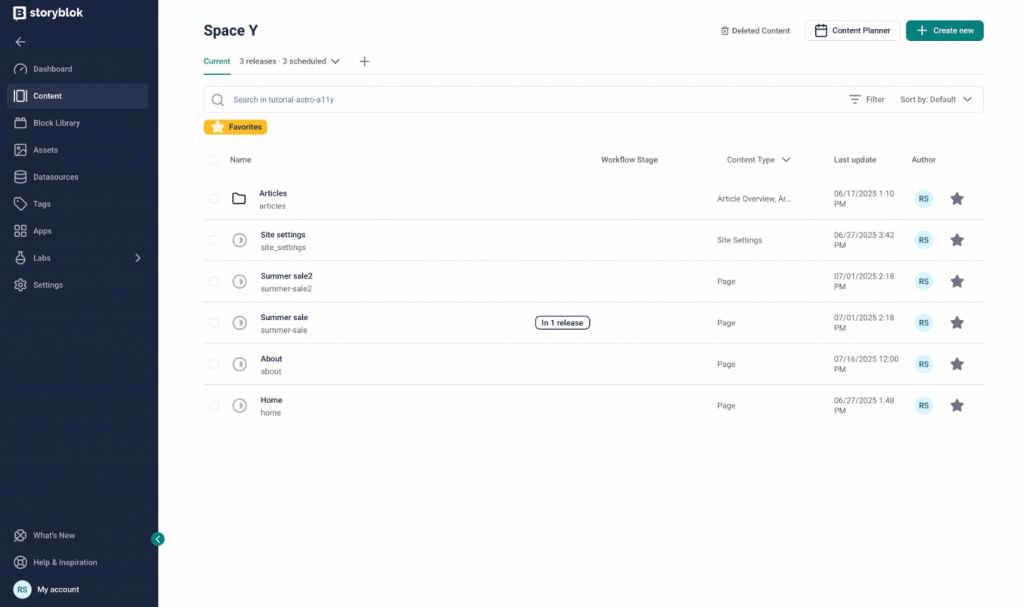
Schedule your publication releases in the Storyblok content space. (Source: Storyblok)
ButterCMS is the best for growing B2B teams that need predictable scaling and multi-site management.
While many of the options in this guide are great for hosting a website, I chose ButterCMS because it is well-suited for B2B organizations that are managing multiple websites, landing pages, or product microsites under one umbrella. Specifically, the multi-site dashboard lets you see all your pages in one place, resulting in a straightforward, frictionless experience.
Additionally, the structured pricing tiers make it easier for growing companies to create a plan for long-term growth. However, some advanced capabilities and unlimited usage require upgrading to higher tiers, so it might not be the best option for smaller teams that require enterprise-grade security.
| Plans and pricing | Monthly | Annual | Roles |
| Free | $0 | 2 | |
| Basic | $79 | $71 | 2 |
| Advanced | $249 | $224 | 3 |
| Professional | $399 | $359 | 3 |
| Enterprise | Contact sales for custom pricing and role allotment. | ||
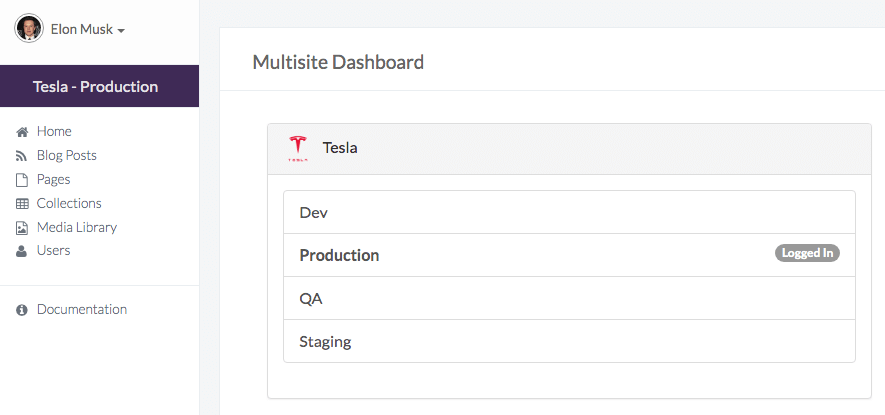
Manage all of your sites in one central dashboard using ButterCMS. (Source: ButterCMS)
Contentful is the best headless CMS for enterprise B2B organizations with complex tech stacks.
When choosing a headless CMS, I was drawn to Contentful because it offers mix-and-match plans that let B2B teams build a custom solution to meet multiple business needs. Specifically, enterprise teams with layered marketing automation systems, CRM tools, and global teams will appreciate its modular architecture and customization capabilities.
By combining content infrastructure with AI tools and visual content modeling, you get the best of all worlds, but also the increased complexity that comes with it. Therefore, this isn’t the best option for teams new to content management or suffering from tool fatigue. But if you have the resources to build a custom CMS, Contentful is a great option.
Contentful offers several content management solutions that let users mix and match plans to suit their needs. To learn more about each plan, contact sales for details on features and pricing.
| Plans (monthly pricing) | |||
| Platform | Free forever | Lite | Premium |
| $0 | $300 | Custom | |
| Personalization | Start | Core | Scale |
| Contact sales for pricing. | |||
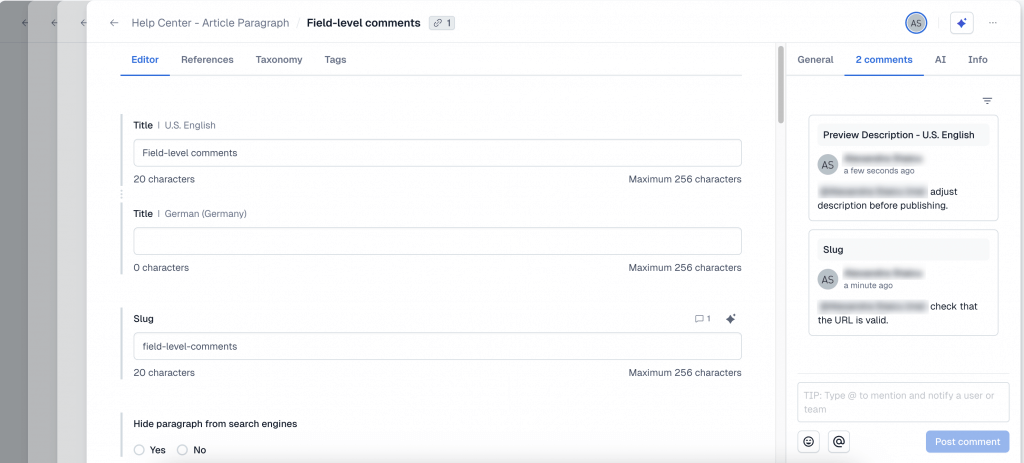
Add comments to entries in Contentful to support team collaboration. (Source: Contentful)
Prismic is the best headless CMS for campaign-driven marketing teams of all sizes.
Many headless CMS platforms lean toward enterprise-level complexity, but not every B2B team needs to manage a large, multi-layered content ecosystem. Sometimes you just want to launch campaigns, manage a product microsite, or maintain a polished project portfolio. That’s where Prismic comes in.
I chose Prismic because it prices by repository, making it especially attractive for managing individual sites or projects. It also offers scalable plans that work well for solopreneurs and small marketing teams. Even though its AI features are not as extensive as some other providers, its release management and structured content tools make it a strong fit for campaign-focused B2B teams.
| Plans and pricing (per repository) | Monthly | Annual |
| Free | $0 per repository | |
| Starter | $15 | $10 |
| Small | $30 | $25 |
| Medium | $180 | $150 |
| Platinum | $750 | $675 |
| Enterprise | Contact sales for custom pricing. | |
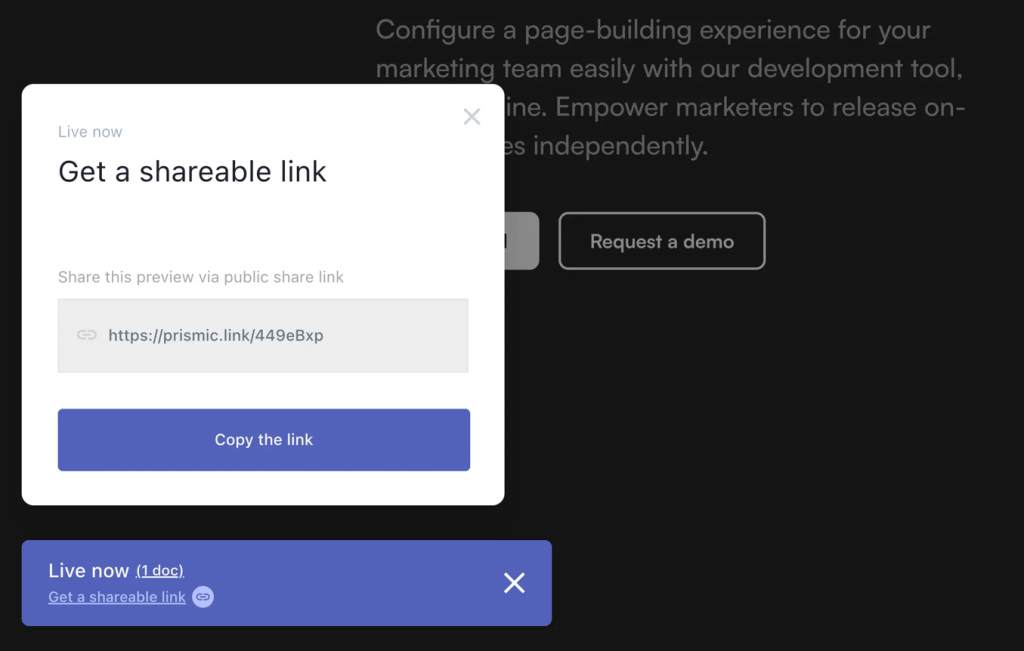
Send a preview link from Prismic to gather feedback on content. (Source: Prismic)

Strapi is the best headless CMS for developer-led teams that want content control and self-hosting.
The primary benefit of a headless CMS is its ability to ease communication between developers and marketing teams, which is why I appreciate Strapi’s open-source development. This gives organizations full control over APIs, data models, and deployment environments. If you’re building highly customized digital experiences or integrating deeply into internal systems, that flexibility is a major advantage.
However, non-technical marketing teams may find Strapi less intuitive than the more visually driven options on the market. But for organizations with strong development teams, Strapi is my top pick for those prioritizing content ownership and customization.
| Plans and pricing | Monthly |
| Community | Free |
| Growth | $45 for 3 seats |
| Enterprise | Contact sales for pricing. |
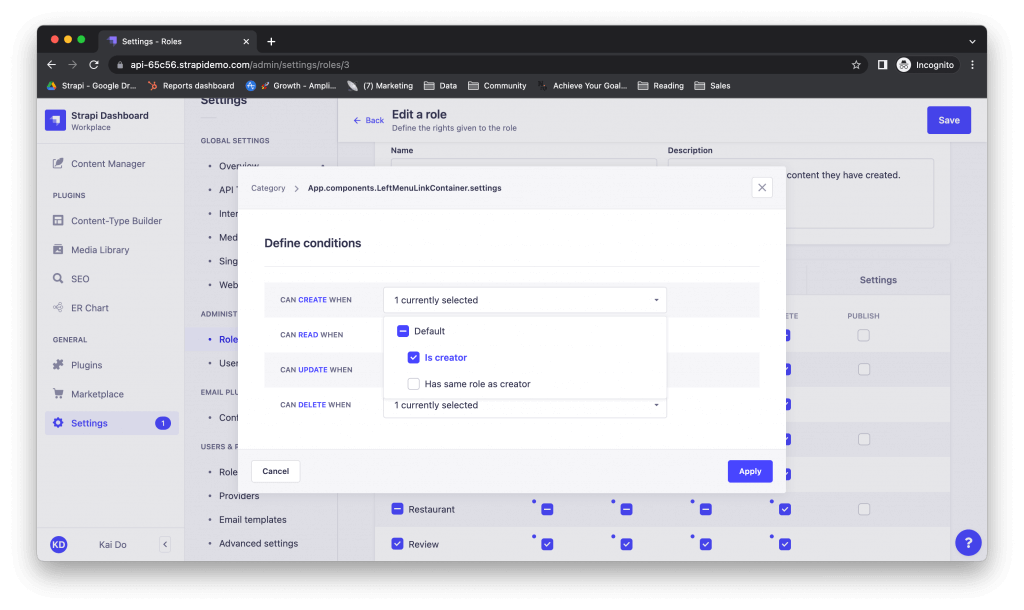
Clearly define roles and permissions in the Strapi workplace. (Source: Strapi)
Hygraph is the best headless CMS for data-driven organizations, integrating multiple systems and APIs.
A key factor that distinguishes a good headless CMS from a great one is its API handling capabilities. It's not just about the number of APIs offered, but rather how effectively they integrate different systems. Hygraph's GraphQL-native foundation makes it especially appealing for B2B organizations that manage complex digital ecosystems with multiple backend services, CRMs, or data sources.
Its content federation capabilities allow teams to pull data from diverse systems into a unified API layer, simplifying integration across large tech stacks. However, the platform does not offer as many options on the base plans as other providers, so I would only recommend Hygraph if you plan to go all in on an enterprise plan.
| Plans and pricing | Monthly | Annual |
| Hobby | $0 | |
| Growth | $299 | $199 |
| Enterprise | Contact sales for custom pricing. | |
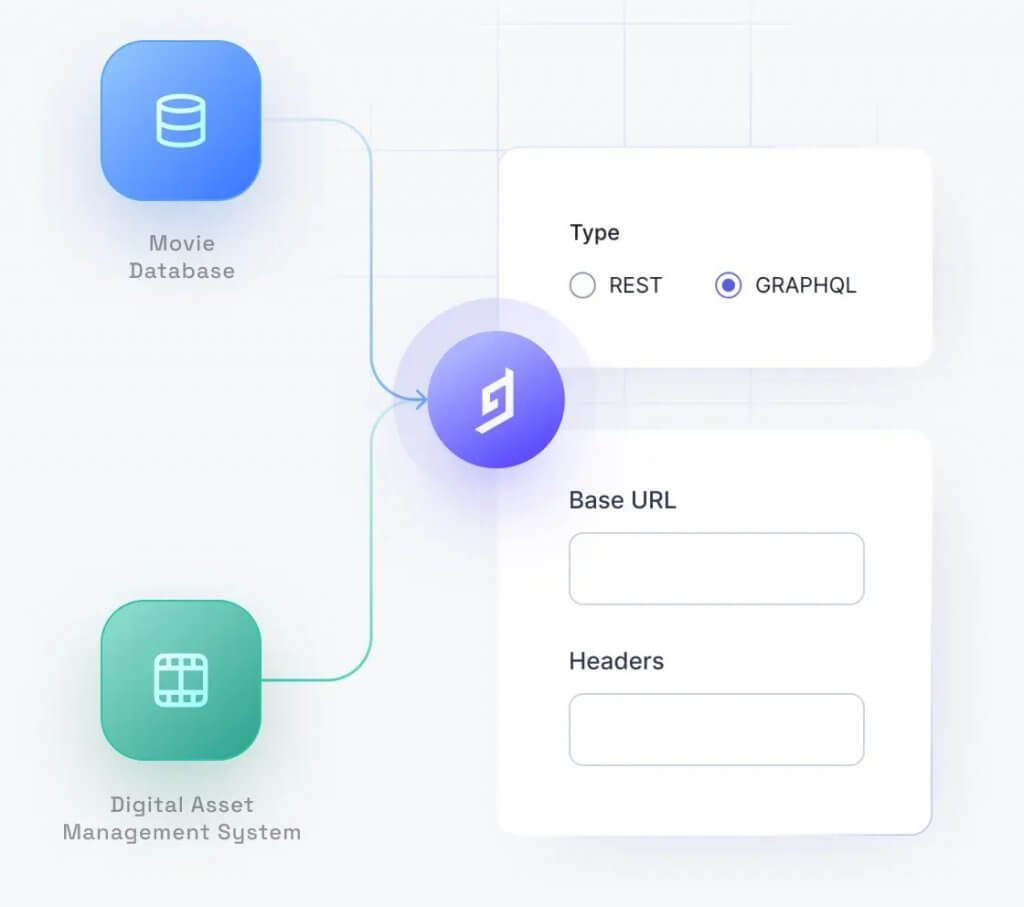
Unify multiple content types and APIs with Hygraph. (Source: Hygraph)
In creating this guide, I evaluated the key features that qualify a provider for ranking among the best headless CMS providers. Therefore, the following list includes the top five features that stood out in my research, and that you can use when choosing a headless CMS.
By focusing on these features, you can select a headless CMS that not only meets your current needs but also offers the scalability and flexibility for future growth.
The best headless CMS solutions offer greater flexibility and omnichannel delivery compared to traditional CMS platforms. They are ideal for businesses that need to publish content across websites, apps, and other digital touchpoints using APIs.
To choose the best headless CMS, evaluate factors such as ease of use, developer experience, hosting options, security, pricing, and integration capabilities. Consider whether you need enterprise-grade scalability or a lightweight solution for a small team.
Yes, many of the best headless CMS platforms offer free tiers or usage-based pricing, making them accessible for startups and small businesses while still supporting enterprise growth as your content needs expand.
When evaluating the best headless CMS for B2B sales and marketing teams, there’s no one-size-fits-all solution. Storyblok shines for teams that need intuitive visual editing, while ButterCMS stands out for multi-site management. If deep customization is top of mind, Contentful delivers enterprise-grade solutions and a robust ecosystem of third-party integrations.
For teams focused on project-driven workflows, Prismic offers repository-based subscriptions for projects of all sizes. Similarly, Strapi’s open source flexibility gives developers full control over APIs and hosting, making it a great choice for personalization. Finally, Hygraph excels when advanced GraphQL functionality and content federation are key to your content strategy.
So, overall, the best headless CMS should integrate seamlessly with your current tech stack and support team collaboration to deliver high-quality content.
Pro tip: Pairing a headless CMS with the right marketing and sales tools amplifies your results. Keep your tech stack connected, track performance consistently, and revisit your CMS needs to keep up with shifts in development or design needs.
Want more actionable insights? Subscribe to the Selling Signals Newsletter.

Selling Signals delivers actionable advice for sales and marketing professionals. Learn strategies that help you hit targets, strengthen customer relationships, and win more business. Get expert advice on lead generation, sales processes, CRM software, sales management, and account management directly to your inbox.
Property of TechnologyAdvice. © 2026 TechnologyAdvice. All Rights Reserved
Advertiser Disclosure: Some of the products that appear on this site are from companies from which TechnologyAdvice receives compensation. This compensation may impact how and where products appear on this site including, for example, the order in which they appear. TechnologyAdvice does not include all companies or all types of products available in the marketplace.