-
News & Trends -
Sales -
Marketing Related Topics -
B2B Software Guides Related Topics -
Free Tools & Resources -
- About Us About Us
The best marketing CRM isn’t the one with the longest feature list; it’s the one that turns customer data into action. When your CRM is truly marketing-ready, it becomes the operating system for growth: a single source of truth for lead capture, segmentation, automated nurture, and performance measurement across the funnel. The shift from scattered tools to connected lifecycle execution helps teams move faster, personalize at scale, and prove impact with cleaner attribution.
In this guide, I rank the best CRM for marketing based on what modern teams actually need. These include marketing depth (not just sales tracking), automation capability, reporting, scalability, and day-to-day usability. Whether you’re starting with a free plan or building enterprise-grade journeys, you’ll find clear “best for” picks to match your strategy.
| Best for | Starting price* | |
| HubSpot CRM | A free marketing CRM | Free or $9/user/month |
| Zoho CRM | All-around SMB marketing | Free or $14/user/month |
| monday CRM | Campaign ops workflows | $12/user/month(minimum of 3 users) |
| Freshsales Suite | Unified CRM and marketing suite | Free or $9/user/month |
| Pipedrive | Sales-led pipeline nurture | $14/user/month |
| Creatio | No-code customization | $25/user/month**(minimum of 5 users) |
| ActiveCampaign | Automation-heavy journeys | $15/user/month |
| Brevo | SMS-led outreach | Free or $8.08/user/month |
| Mailchimp | Newsletter-driven marketing | Free or $6.50/user/month*** |
| Salesforce | Enterprise cross-channel journey orchestration | $25/user/month |
*All per-user prices are with a one-year commitment unless otherwise noted.
**Standard contract term of three years.
***Monthly billing only.
| Free plan | Free trial | Email marketing | Automation and journeys | Landing pages and forms | |
 | ✓2 users | N/A | ✅ | ✅ | ✅ |
| Visit HubSpot CRM | |||||
 | ✓3 users | 15 days | ✅* | ✅* | ✅* |
| Visit Zoho CRM | |||||
 | ✕ | 14 days | ⚠️ | ⚠️ | ⚠️ |
| Visit monday CRM | |||||
 | ✓3 users | 21 days | ✅ | ✅ | ✅ |
| Visit Freshsales Suite | |||||
 | ✕ | 14 days | ⚠️ | ⚠️ | ⚠️ |
| Visit Pipedrive | |||||
 | ✕ | 14 days | ✅ | ✅ | ✅ |
| Visit Creatio | |||||
 | ✕ | 14 days | ✅ | ✅ | ✅ |
| Visit ActiveCampaign | |||||
 | ✓1 user | N/A | ✅ | ✅ | ✅ |
| Visit Brevo | |||||
 | ✓Unlimited users | N/A | ✅ | ✅ | ✅ |
| Visit Mailchimp | |||||
 | ✕ | 30 days | ✅ | ✅ | ✅ |
| Visit Salesforce | |||||
Legend:
✅= Native feature included
⚠️= Limited or requires add-on/integration
* = Available via ecosystem or bundled suite
It’s a free-to-start marketing CRM that combines lead capture, email marketing, automation, and reporting in one platform.
HubSpot is the best free marketing CRM for teams that want to start fast and grow without switching platforms. Its standout advantage is the shared database: every form fill, email engagement, and campaign touchpoint is tied to a single contact record, which makes segmentation, nurturing, and reporting far more actionable.
The trade-off is cost at scale. If you need advanced workflows or attribution, or if you expect rapid list growth, you’ll likely move into higher tiers. Still, for inbound-focused teams that value ease of use and an integrated marketing stack, HubSpot is a strong pick.
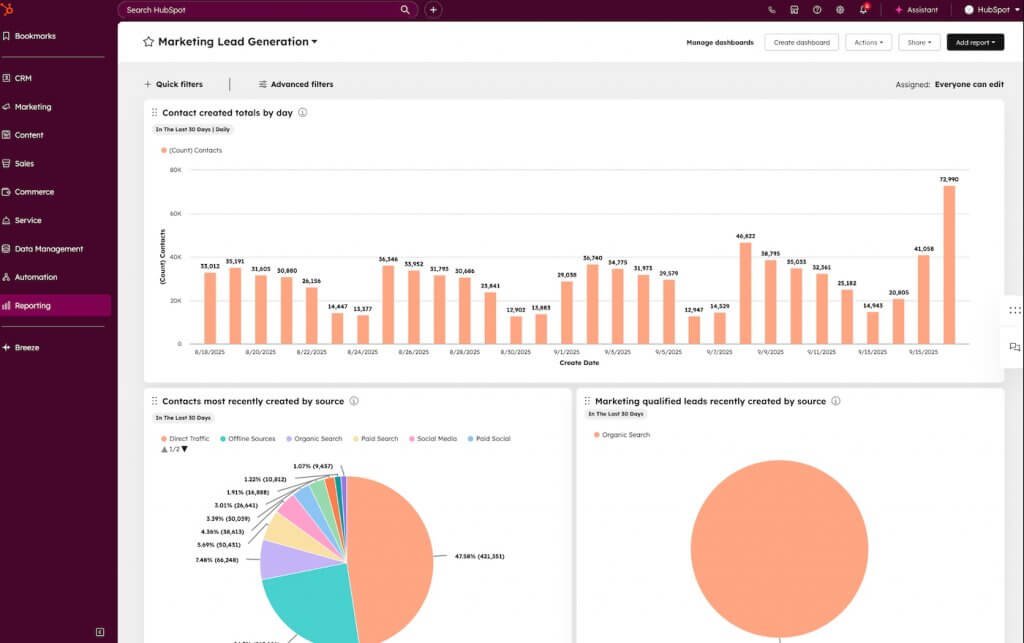
HubSpot Marketing Hub’s dashboard gives marketers a real-time view of lead volume and source performance to optimize campaigns faster. (Source: HubSpot)
| HubSpot Marketing Hub | Free | Starter | Professional | Enterprise |
| Monthly price, billed annually | $0 for 2 users | $9/user | $800 for 3 users | $3.600 for 5 users |
| Monthly price, billed monthly | $0 for 2 users | $15/user | $890 for 3 users | N/A |
It’s a cost-scalable CRM for SMBs that supports segmentation, automation, and campaign tracking, especially when paired with Zoho’s marketing apps.
Zoho CRM is the best marketing CRM for SMBs that want a customizable CRM with room to scale into more advanced marketing. It handles the essentials — lead management, segmentation, workflows, and reporting — then expands through Zoho Campaigns or Zoho Marketing Automation for email campaigns and nurture programs.
The upside is cost-to-capability. You get strong customization and automation without enterprise pricing. The trade-off is product sprawl: some marketing features live in separate Zoho tools, so teams may need to bundle apps to get a full marketing CRM stack.
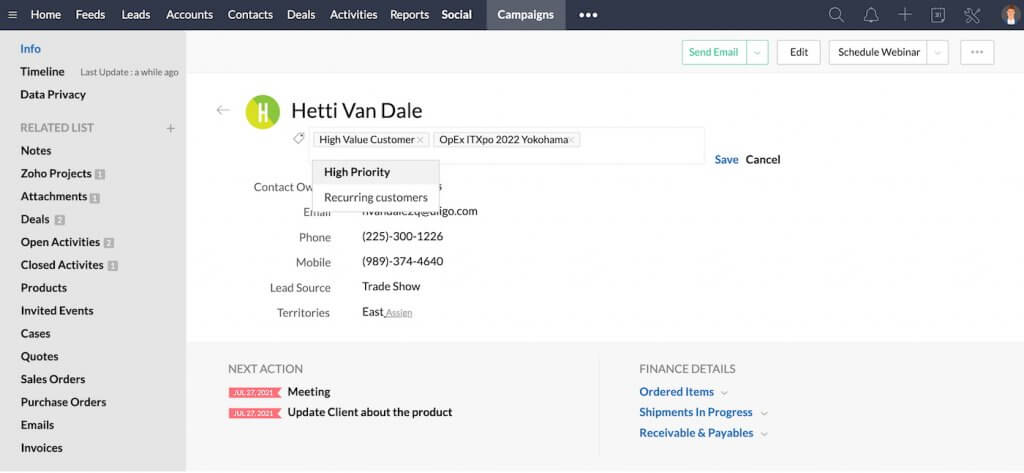
Zoho CRM lets teams segment contacts with tags and priority labels to target campaigns more effectively. (Source: Zoho CRM)
| Free | Standard | Professional | Enterprise | Ultimate | |
| Monthly price, billed annually | $0 for 3 users | $14/user | $23/user | $40/user | $52/user |
| Monthly price, billed monthly | $0 for 3 users | $20/user | $35/user | $50/user | $65/user |
It’s a workflow-first CRM for tracking campaigns, tasks, and pipelines in a customizable workspace.
monday CRM is the best CRM for marketing ops teams that need structure and visibility across campaigns. It excels at turning campaign execution into repeatable workflows using boards, statuses, and automations to manage timelines, handoffs, and approvals across teams.
The trade-off is that it’s not a marketing automation platform at its core. If you need advanced email journeys or attribution, you’ll likely pair it with dedicated marketing tools. But it’s a strong fit for teams prioritizing operational control and cross-functional coordination.
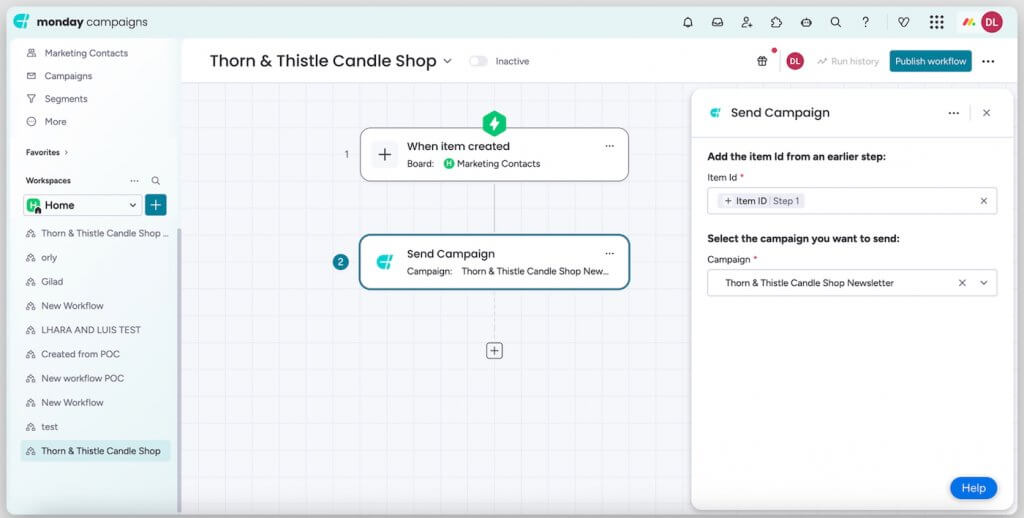
monday crm’s built-in Campaigns engine lets teams automate campaign workflows — from contact triggers to email sends — in a visual builder. (Source: monday.com)
| Basic | Standard | Pro | Ultimate | |
| Monthly price, billed annually | $12/user | $17/user | $28/user | Contact sales |
| Monthly price, billed monthly | $18/user | $25/user | $41/user |
*All plans require a minimum of three users.
It’s a unified CRM and marketing automation suite designed for growing teams that want sales and marketing in one platform.
Freshsales Suite is best for growing teams that want a unified CRM and marketing automation system without stitching together multiple tools. Because Freshsales (CRM) and Freshmarketer (marketing software) operate within the same environment, teams can manage contacts, launch campaigns, build nurture journeys, and track engagement from one place.
Its strength is operational simplicity. You get lifecycle marketing capabilities without the heavier configuration required by enterprise platforms. While it may not offer the ecosystem breadth of larger competitors, it’s a strong fit for teams prioritizing alignment between sales and marketing inside a single suite.
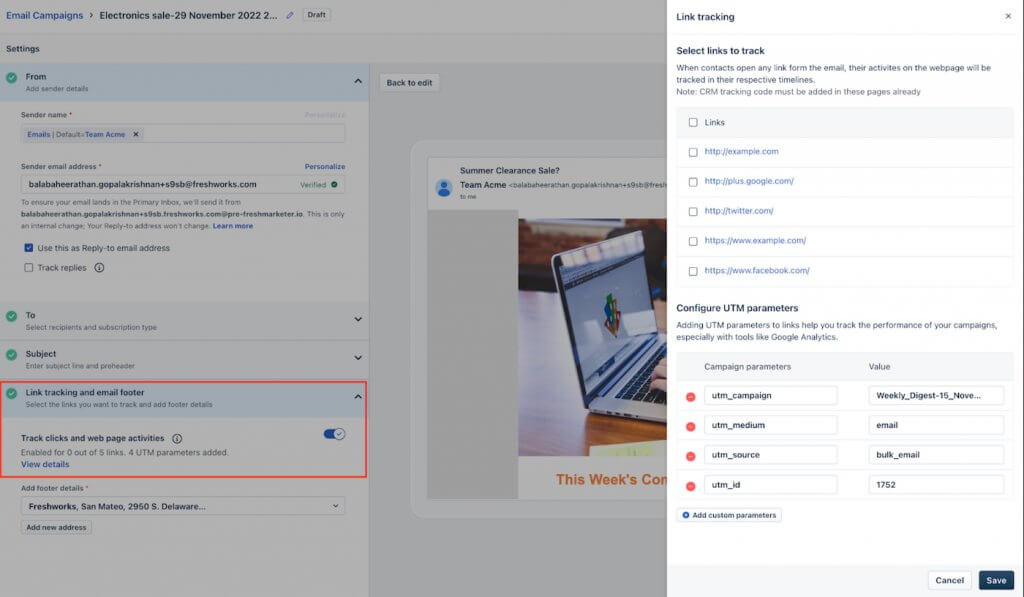
Freshsales Suite enables email link tracking and UTM tagging to measure campaign performance accurately. (Source: Freshworks)
| Free | Growth | Pro | Enterprise | |
| Monthly price, billed annually | $0 for 3 users | $9/user | $39/user | $59/user |
| Monthly price, billed monthly | $0 for 3 users | $11/user | $47/user | $71/user |

It’s a sales-focused CRM with optional email marketing and light automation for pipeline-driven teams.
Pipedrive is best for sales-led teams that need structured pipeline management with basic marketing support. Its core strength is deal tracking, which includes custom stages, activity reminders, and sales automations keep reps focused on moving opportunities forward. Tracking leads is a must, given that lead-to-customer conversion is the second most important marketing KPI (HubSpot State of Marketing Report).
With the Campaigns add-on, teams can send email campaigns and segment contacts, but it’s not built for complex lifecycle marketing or multi-channel journeys. Nevertheless, Pipedrive is a practical fit if marketing primarily supports pipeline conversion rather than running advanced automation.
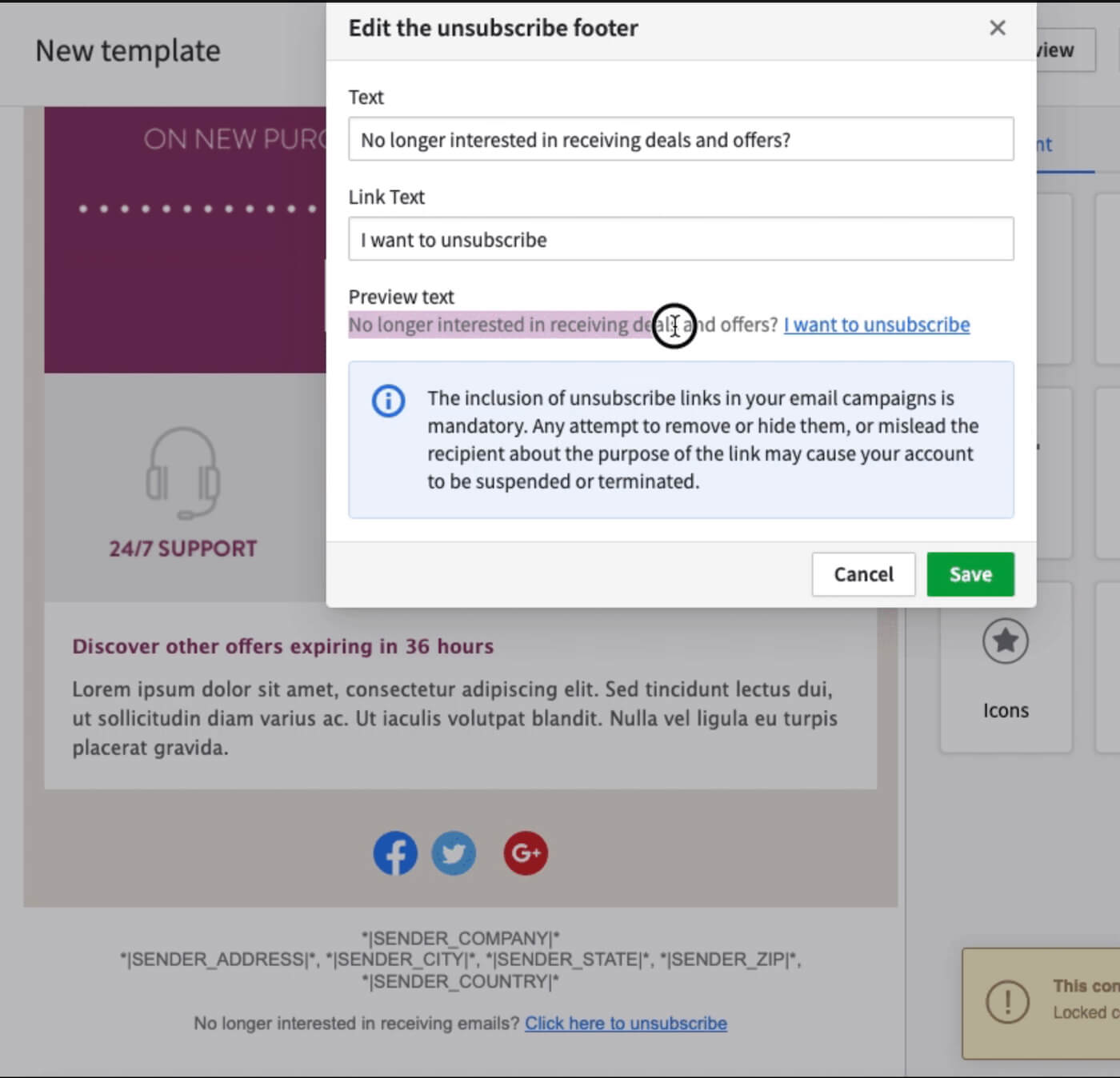
Pipedrive Campaigns add-on lets teams manage email templates, track engagement, and stay compliant with built-in unsubscribe tools. (Source: Pipedrive)
| Lite | Growth | Premium | Ultimate | |
| Monthly price, billed annually | $14/user | $39/user | $59/user | $79/user |
| Monthly price, billed monthly | $24/user | $49/user | $79/user | $99/user |
It’s a no-code CRM and marketing automation platform built for customizable, process-driven campaign management.
Creatio is best for midmarket and enterprise teams that need structured, customizable marketing processes. Its no-code platform lets teams design campaign workflows, automate lead routing, and align marketing with sales and service without relying heavily on developers.
The platform stands out for process control and flexibility. You can tailor journeys, approvals, and handoffs to match complex operating models. The trade-off is implementation effort since Creatio requires more configuration than plug-and-play tools. Still, it’s a strong choice for organizations that prioritize customization and governance.
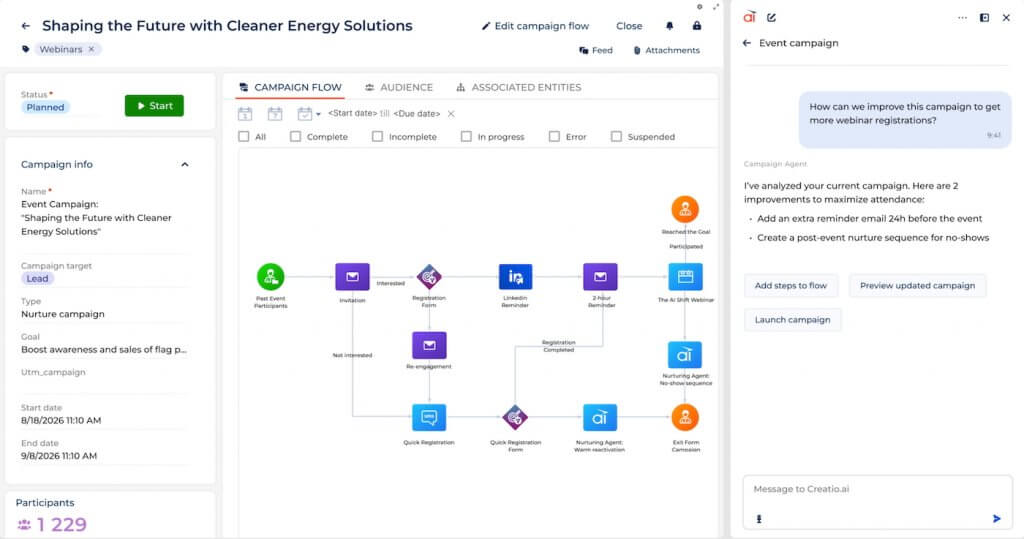
Creatio enables fully customizable, no-code campaign workflows to automate complex, multi-step marketing journeys. (Source: Creatio)
Base Platform
Products
*Standard contract term of three years.
It’s a marketing automation–first platform with built-in CRM for advanced segmentation and lifecycle email campaigns.
ActiveCampaign is best for teams focused on lifecycle marketing and automation depth. Its visual builder supports behavior-based workflows, dynamic segmentation, and personalized email campaigns triggered by engagement data. Personalization is an especially handy feature, as it is key to the success of most marketers (Salesforce State of Marketing).
The CRM component covers contact and basic deal tracking, but it’s not built for complex sales operations. Still, ActiveCampaign is the best marketing CRM for you if your priority is sophisticated nurture programs rather than pipeline-heavy sales management.
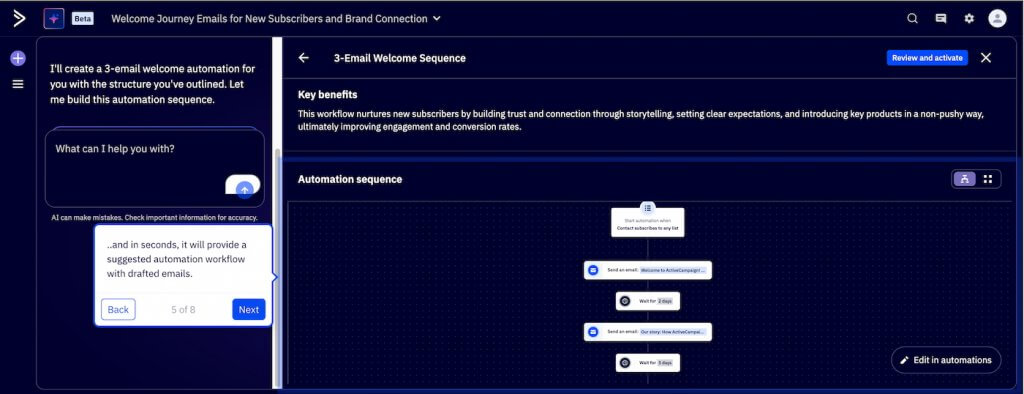
ActiveCampaign’s automation builder helps marketers design multi-step email journeys with triggers, delays, and personalized messaging. (Source: ActiveCampaign)
| Email plans | Starter | Plus | Pro | Enterprise |
| Monthly price, billed annually | Starts at $19/user | Starts at $59/user | Starts at $89 for 3 users | Starts at $159 for 5 users |
| Monthly price, billed monthly | Starts at $15/user | Starts at $49/user | Starts at $79 for 3 users | Starts at $145 for 5 users |
It’s a multichannel marketing platform with built-in email, SMS, automation, and lightweight CRM tools.
Brevo is best for teams focused on email and SMS campaigns without needing advanced sales CRM functionality. Its free plan supports unlimited contacts, and the platform makes it easy to build segmented campaigns and simple automation flows.
While it includes contact management and basic deal tracking, it’s not built for complex lifecycle marketing or sales-heavy operations. However, Brevo is a practical choice for SMBs prioritizing multichannel outreach at a manageable cost.
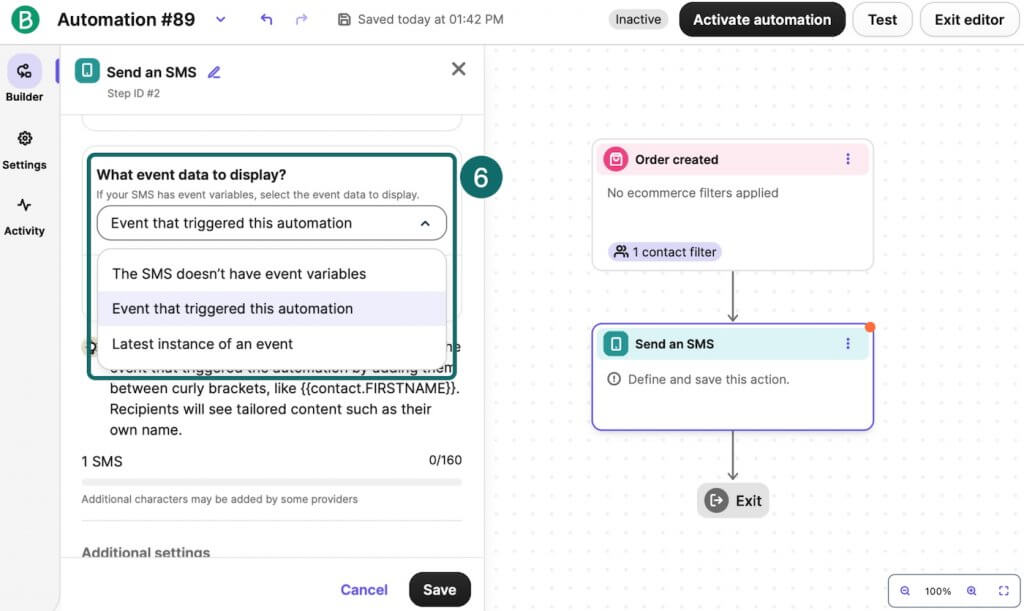
Brevo lets marketers automate SMS campaigns based on triggers like order activity. (Source: Brevo)
| Free | Starter | Standard | Professional | Enteprise | |
| Monthly price, billed annually | $0 for 1 user | $8.08/user | $16.17/user | $449.08 for 10 users | Contact sales |
| Monthly price, billed monthly | $0 for 1 user | $9/user | $18/user | $499 for 10 users |

It’s an email marketing platform with built-in audience management and automation for newsletter and lifecycle campaigns.
Mailchimp is best for teams running email-first programs where audience segmentation and send performance matter more than CRM pipeline management. These include newsletters, promotions, and basic lifecycle sequences. It’s easy to build campaigns, segment lists, and automate common flows like welcome series and re-engagement.
Mailchimp manages audiences and engagement history well, but it isn’t designed to replace a true sales CRM. Still, you’ll find it to be a strong fit for brands prioritizing email execution over end-to-end revenue ops.
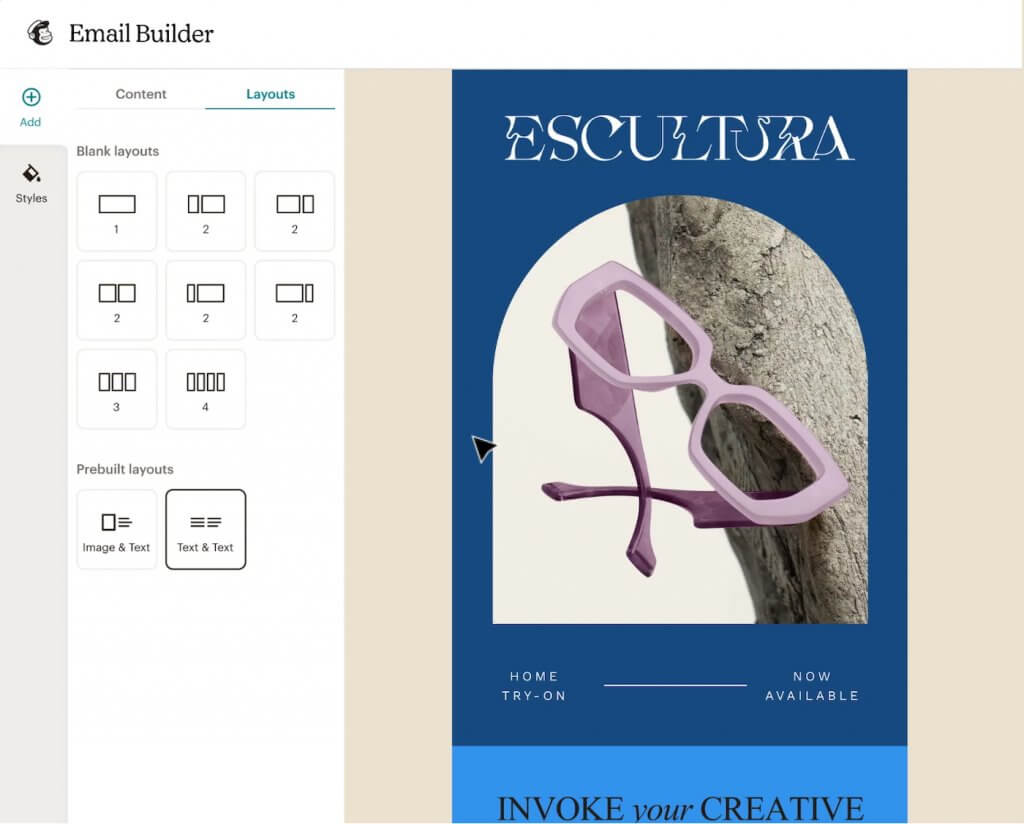
Mailchimp’s drag-and-drop email builder makes it easy to design branded marketing campaigns with customizable layouts. (Source: Mailchimp)
*Monthly billing only.
It’s an enterprise platform for orchestrating cross-channel campaigns and customer journeys at scale.
Salesforce Marketing Cloud is best for enterprise teams running complex lifecycle programs across multiple channels. Its core strength is orchestration: you can build structured journeys, trigger messages based on customer behavior, and coordinate campaigns across email and mobile channels with enterprise-grade controls.
Marketing Cloud is powerful, but it’s not plug-and-play; most teams need admin/technical support and clear data governance to get full value. If you’re operating at enterprise scale and need cross-channel execution, it’s a strong fit. Smaller teams, however, may find it more platform than they need.
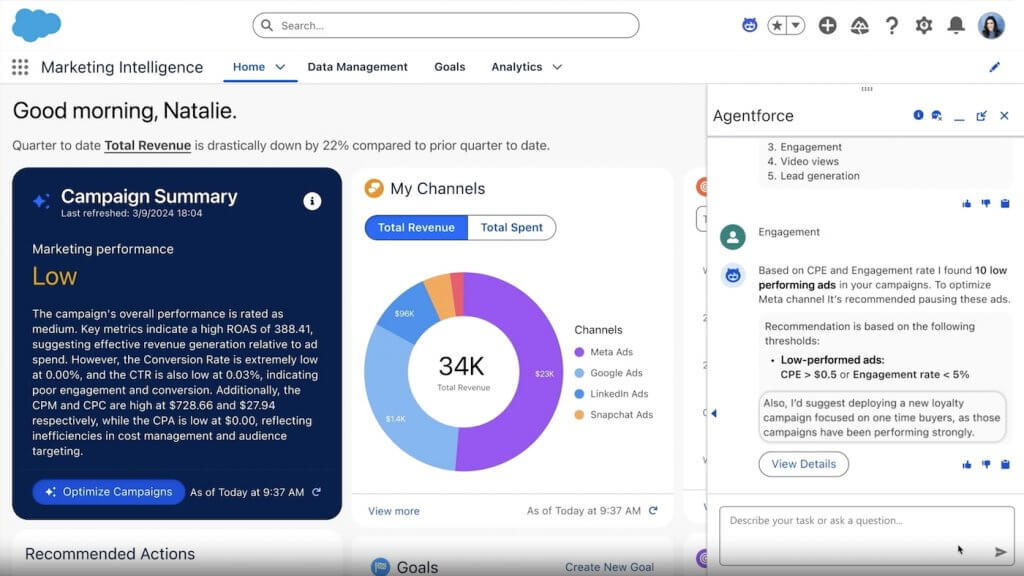
Salesforce Marketing Cloud dashboard provides enterprise-level campaign insights, revenue tracking, and AI-driven optimization recommendations. (Source: Saleforce)
| Salesforce Marketing Cloud | Salesforce Starter | Salesforce Pro | Marketing Cloud Growth Edition | Marketing Cloud Advanced Edition |
| Monthly price, billed annually | $25/user | $100/user | $1,500/org | $3,250/org |
| Monthly price, billed monthly | $35/user | N/A | ||
To identify the best marketing CRMs, I assessed a curated list of top providers based on pricing, features, compatibility, user experience, and real user ratings. Each platform was scored using the following criteria.
Transaction-based pricing, yearly or bulk discounts, value for money, and scalability were key factors in evaluating the pricing. Overall, I placed providers that offered free trials and free plans in higher regard.
When evaluating marketing CRMs, I started with the core CRM features that matter for any team — solid contact and lead management, customizable pipelines, and clear reporting and analytics.
From there, I prioritized the capabilities that make a CRM truly marketing-ready: audience segmentation, lead capture (forms and landing pages), marketing automation and nurture workflows, email campaign tools, and visibility into campaign performance and attribution.
I also looked for a reliable mobile app and a strong integration ecosystem, especially with email providers, ad platforms, social tools, ecommerce, and analytics. These capabilities help the CRM scale and fit into a real marketing tech stack.
For niche and advanced features, I focused on how each CRM for marketers supports real-world campaign execution — not just flashy add-ons. I looked for practical capabilities like advanced segmentation, multi-step automation, customer journeys, A/B testing, and lead scoring and grading. I also evaluated conversion-focused tools, including landing pages, forms, and personalization features.
I assessed how each platform uses AI to make marketing teams faster and more effective, with features like predictive lead scoring, send-time or content recommendations, automated audience insights, subject-line and copy generation, and performance forecasting.
These areas show how well a marketing CRM can help teams streamline campaigns, improve targeting and decision-making, and drive measurable growth across the funnel.
I considered how intuitive and user-friendly each platform is. I assessed factors such as the availability of built-in templates, automation options, guided onboarding, simplicity of setup, and how easily the system can scale as a business grows.
These elements help determine how quickly teams can adopt the software and start seeing value from its features.
Comprehensive customer support ensures users get the most out of their CRM experience. I evaluated each provider based on the availability of support channels such as phone, email, and live chat, as well as the accessibility of their service hours.
I also looked at the presence of self-service resources, including knowledge bases, user communities, and product documentation, which empower users to solve issues and learn independently.
I combined hands-on evaluation of these marketing CRMs with insights from verified user reviews. That helped me gauge real-world value for the price, including how well each platform supports core marketing work, such as segmentation, automation, email campaigns, and reporting.
User feedback also clarified day-to-day usability — how intuitive each tool is to navigate, how smooth setup and onboarding are, and how easily it fits into a typical marketing tech stack.
A marketing CRM is CRM software with built-in marketing tools. It combines contact and lead management with email campaigns, automation workflows, segmentation, landing pages, and campaign reporting — all connected to a single customer database.
A CRM manages contacts, pipelines, and customer data. Marketing automation software runs campaigns, nurture sequences, and segmentation. A marketing CRM brings both together so teams can capture leads, automate follow-ups, and track marketing’s impact on revenue.
The best CRM for marketing depends on your goals. HubSpot is ideal for all-in-one inbound marketing; Zoho CRM is a flexible value pick; monday CRM fits workflow-driven teams; Freshsales Suite combines CRM and automation; and Salesforce is best for complex enterprise needs.
Yes. Most marketing CRMs include email campaigns, automation, and segmentation. Many also support A/B testing, personalization, and performance tracking.
Look for contact management, segmentation, marketing automation, email tools, landing pages, reporting, and integrations with ads, ecommerce, and analytics platforms. Prioritize features that align with your campaign's complexity and growth goals.
A marketing CRM centralizes customer data so you can capture leads, segment audiences, automate follow-ups, and measure campaign impact in one place. The right choice depends on budget and program complexity: HubSpot is a strong starting point, Zoho CRM fits most SMBs, and Salesforce Marketing Cloud supports enterprise cross-channel journeys. Choose the platform that helps you move faster today while supporting the level of personalization and reporting you’ll need as you scale.

Selling Signals delivers actionable advice for sales and marketing professionals. Learn strategies that help you hit targets, strengthen customer relationships, and win more business. Get expert advice on lead generation, sales processes, CRM software, sales management, and account management directly to your inbox.
Property of TechnologyAdvice. © 2026 TechnologyAdvice. All Rights Reserved
Advertiser Disclosure: Some of the products that appear on this site are from companies from which TechnologyAdvice receives compensation. This compensation may impact how and where products appear on this site including, for example, the order in which they appear. TechnologyAdvice does not include all companies or all types of products available in the marketplace.